Welcome
This is an exploration on foundational Generative AI conversational applications.
The following resources are designed to show how to build a private, self-hosted platform for AI applications.
Community resources, cloud infrastructure, and open source tools are used to demonstrate the process.
NOTE: All data used in these demonstrations should be non-sensitive, and for testing purposes only.
Components used here provide a foundation for continuing your Gen AI journey.
Step 1 - Take Control of the Interface with Open WebUI
The first step to building your private platform is to take control of the Chat Application Web Interface.
The leading open source solution available for VERY fast prototyping is: Open WebUI (docs https://github.com/open-webui/open-webui).
This self-hosted web interface is capable of running in a completely private environment.
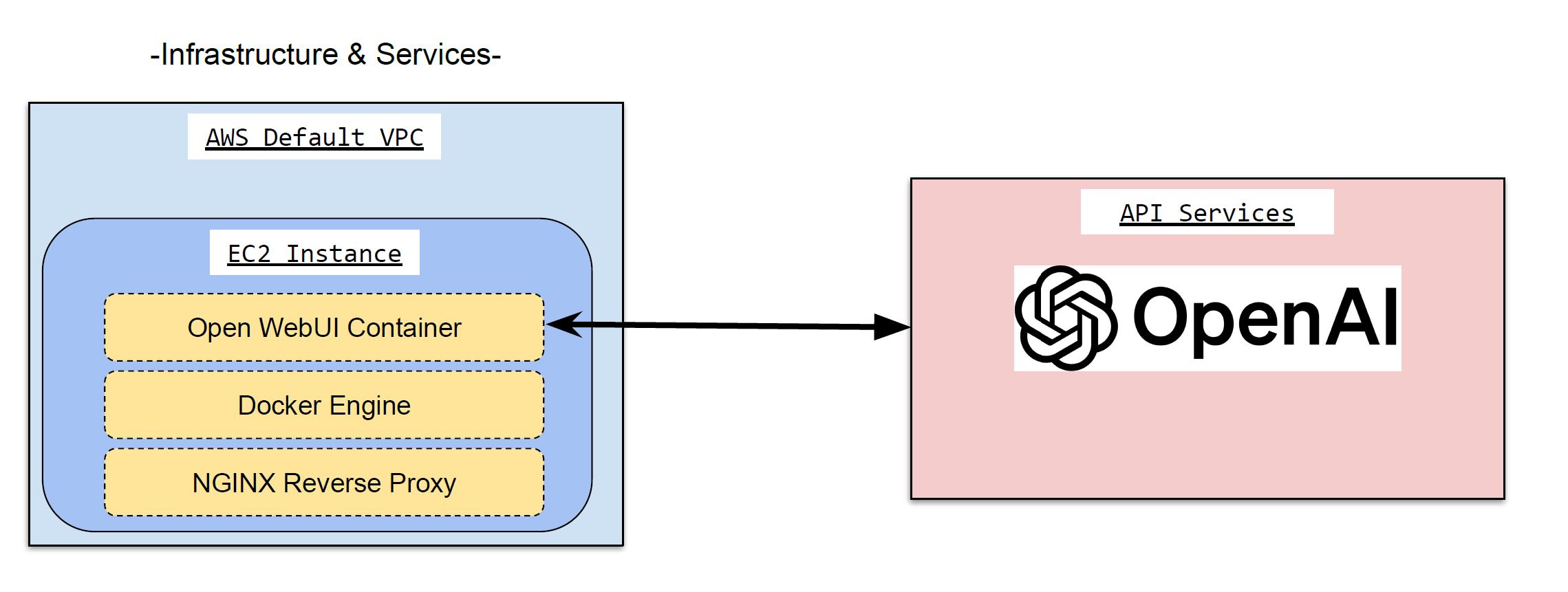
In this demonstration, we’ll deploy an instance of the Open WebUI application – and connect it to OpenAI APIs.
Solution Overview
Components:
- Open WebUI
- Docker Service, Nginx Service
- AWS EC2 Instance
Privacy & Security Considerations
CRITICAL NOTE: At this step, the solution is still making use of OpenAI via API calls.
Question and answer contents is still traversing through the vendor’s environment.
Use ONLY non-sensitive data for testing purposes!
Core Benefits at this step:
- Full control of user onboarding and account management
- EXTENSIVE LOGGING of all request & response traffic; this can be integrated into AWS CloudWatch
Other interesting features include:
- Authentication Integrations: Access via Corp. Identities
- UI Customizations: w/ access to Styling & Web page files [*ALL* files for that matter]
- Model files, or adjustments to query behavior with basic prompt tuning
Solution Demo
Watch the video below for a demonstration of the Open WebUI deployment.
Template Source File(s)
Step 2 - Use "Documents" to Interact with YOUR OWN Data
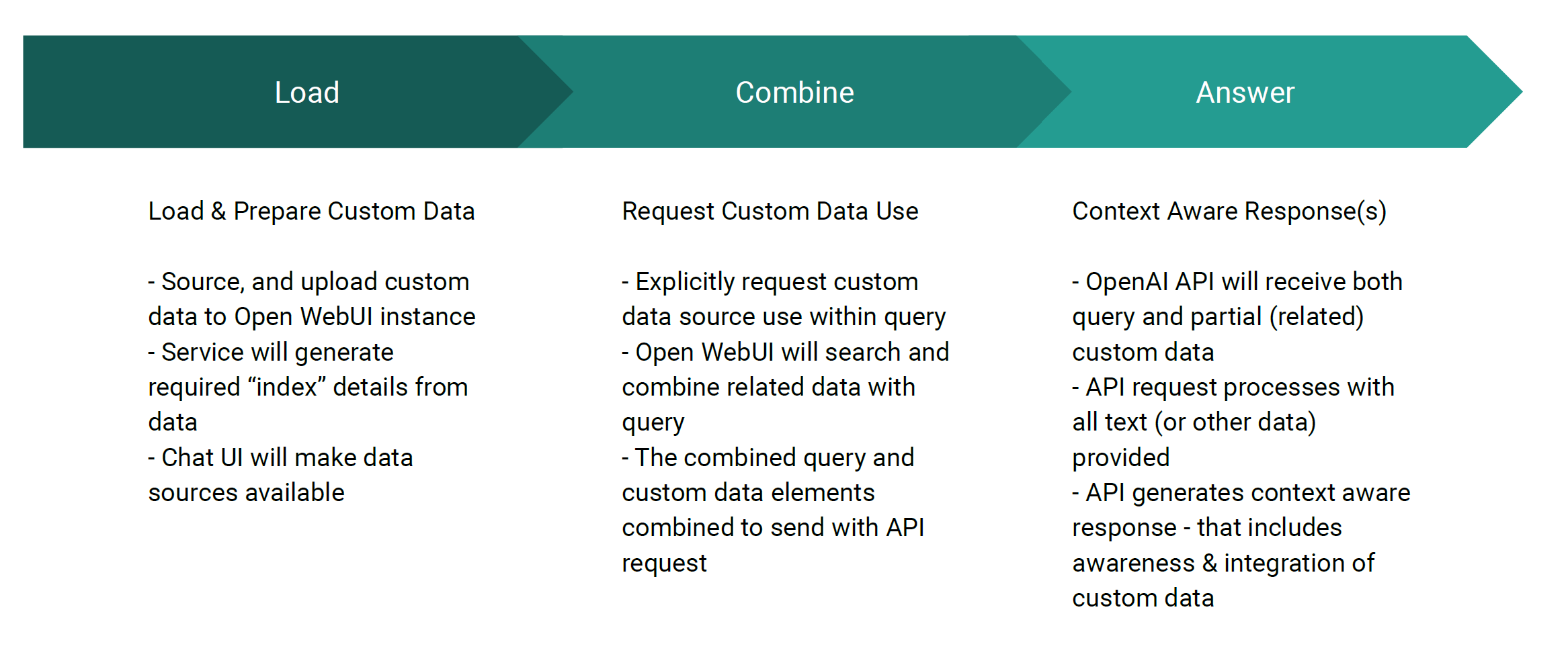
Next, proof of concept the addition of private, or internal data sources.
WARNING: This step will continue to make use of OpenAI (vendor) APIs for both: RAG addition, and also RAG based queries!
This will make any private data AVAILABLE to OpenAI - so proceed with TEST DATA ONLY at this step
Solution Overview
Partners
Privacy & Security Considerations
CRITICAL NOTE: At this step, the solution is still making use of OpenAI via API calls.
All information is still traversing through the vendor’s environment.
Use ONLY non-sensitive data for testing purposes!
Core Benefits at this step:
- Give ChatAPP access to information that is not available via OpenAI
- Explicitly manage the context of the information used in the query
- Provide alternative interface(s) for existing data resources
Other interesting features include:
- May increase speed of search based workflows with LLM (and RAG) based tools
- Work with more natural language results
- Can be integrated with other ChatAPP / LLM tools to combine BOTH general and specific data sources
Solution Demo
Watch the video below for a demonstration of using uploaded data sources.
Template Source File(s)
Step 3 - Install Self-Hosted LLM Models
Enables End-to-End Control of ALL Data
Finally, we'll integrate COMPLETELY self-hosted components for both the interface, RAG, and LLM consumption.
At this point, ALL data is contained within your platform.
This deployment disconnects the generative AI tool from all vendor APIs & services.
Solution Overview

Privacy & Security Considerations
Core Benefits at this step:
- FULLY contained, Private Solution
- Able to isolate the resource, and disable public Internet access if needed/desired
- All data, interactions, traffic, and logs are wholly contained WITHIN the platform
Primary Considerations & Cautions:
- SIGNIFICANT COST potential for GPU resources
- Reliance on community resources & support (unless willing to explore internal model development & training)
- Increased management overhead for updates, and maintenance of the LLM models
Solution Demo
Watch the video below for a demonstration of self-hosted LLM Models in Use.